top of page


How to Add Your Website URL to Your Facebook Business Profile
Follow the steps below to display your website link on your business’s Facebook page.
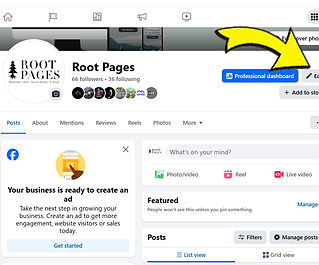
1. Go to your Facebook business profile
-
Log in to Facebook.
-
Navigate to your business page.
-
Click Edit next to the buttons under your cover image.
2. Open your business information settings
-
Scroll down to the bottom and look for Edit Your About Info

Step 3 — Add your website URL
-
Find the Website field.
-
Enter your website URL (example: www.rootpages.net).
Step 4 — Save the changes
-
Don't forget to click Save to save your changes.

bottom of page